How Long Does 3D Printing Take? Key Factors Explained
3D printing is transforming industries. It’s fast, flexible, and innovative. The main advantage of 3D printing, according to 69% of businesses, is that it can produce detailed and complex shapes.
But how long does it take to 3d print something? The answer isn’t straightforward.
Print times can vary widely. Factors like model complexity, size, and chosen technology play a crucial role. Understanding these elements can help you plan your projects better.
Let’s explore what affects print times and how to optimize them for your needs.
Understanding 3D Printing Timeframes
To grasp how long it takes to 3D print an object, it’s essential to understand the timeframes involved. On average, 3D printing can take anywhere from a mere 30 minutes to several days.
The variation is primarily driven by:
- Object Size: Smaller models print faster.
- Complexity: Intricate designs take longer.
- Printing Technology: Different technologies have varying speeds.
Knowing these timeframes helps set realistic expectations for your projects, ensuring you allocate enough time for production without unnecessary delays.
Key Factors Affecting 3D Print Times
Complexity of the 3D Model
The complexity of your 3D model is a primary factor in determining print times. Complexity refers to how intricate and detailed the design is. For example:
- Simple Models: A basic design, like a cube or a simple phone stand, may only take a few hours to print. The printer moves quickly with fewer details to manage.
- Complex Models: In contrast, a detailed figurine with multiple moving parts or elaborate features can take significantly longer—sometimes several hours to even days, depending on the level of detail.
Optimizing your model can greatly reduce print times. Here are some optimization tips:
- Simplify Designs: Remove unnecessary details or elements that don’t impact functionality.
- Use Hollow Structures: Hollowing out solid parts can reduce material usage and speed up the printing process.
- Test Iteratively: Before finalizing a complex model, run smaller test prints to gauge time and adjust complexity as needed.
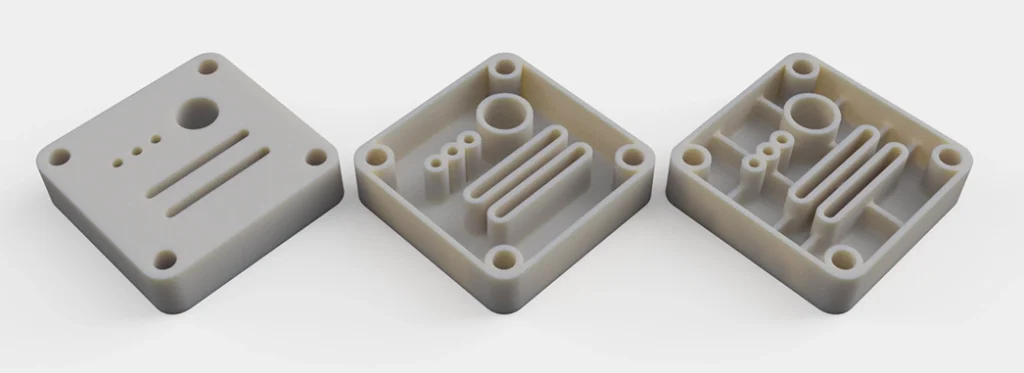
Hollowing parts for 3D Printing
Size of the Object
The size of your 3D print is another crucial factor affecting duration. Larger objects require more material and printing time, as the printer must cover more area.
- Scaling Models: If time is critical, consider scaling down your model. A smaller version can significantly decrease print time while still serving your purpose.
- Balancing Size and Detail: Ensure that any size reduction doesn’t sacrifice important details for the model’s function.
Layer Height and Thickness
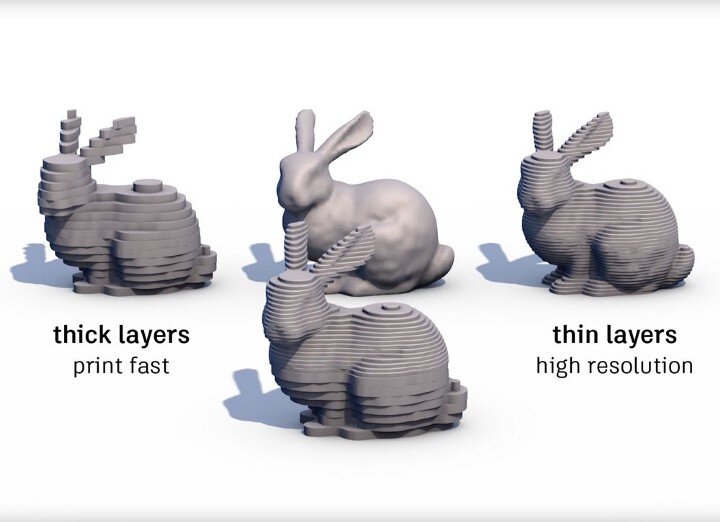
Layer height refers to the thickness of each layer the printer deposits. It plays a vital role in both print quality and speed.
- Thicker Layers: Using a higher layer height can speed up the printing process because there are fewer layers to print. However, this may sacrifice detail and smoothness.
- Thinner Layers: Thinner layers enhance detail and create a smoother finish, but they require more time to print due to the increased number of layers.
Balancing print speed and quality is essential. Assess your project’s needs to determine the most appropriate layer settings.
3D Printing Technology
Different 3D printing technologies have distinct characteristics that influence print speed:
- FDM (Fused Deposition Modeling): Generally slower for intricate designs but effective for simpler objects.
- SLA (Stereolithography): Offers high detail and smoother finishes but often takes longer to print.
- SLS (Selective Laser Sintering): Provides fast prints for complex geometries but requires specific conditions.
Choosing the right technology based on your project’s requirements can significantly impact overall time efficiency.
Printer Settings and Configuration
Your printer settings determine how quickly a print can be completed.
Key settings include:
- Print Speed: A faster print speed can decrease time, but it may affect quality.
- Infill Density: A lower infill density reduces material usage and print time, though it may impact the strength of the final product.
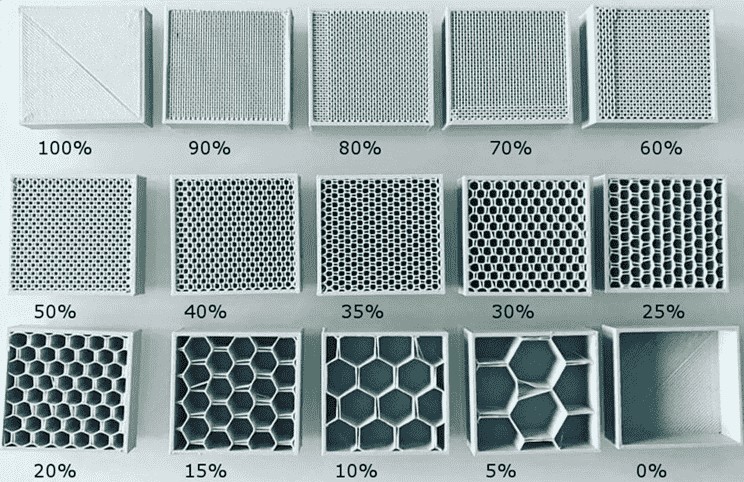
To optimize settings for quicker prints without sacrificing quality, consider the following:
- Use Default Settings: Many printers have preset settings optimized for balance.
- Experiment with Settings: Test various configurations to find the best combination of speed and quality for your specific prints.
Material Choice
The type of material you choose for printing significantly influences print time:
- Common Materials: PLA and ABS are popular choices but may have varying print times based on their properties.
- Material Characteristics: Some materials require longer drying or curing times, which can extend overall project timelines.
When selecting materials, weigh the pros and cons to ensure they meet your needs without unnecessarily prolonging print duration.
Post-Processing Requirements
Post-processing tasks can add considerable time to your project. Common tasks include:
- Cleaning: Removing excess material or supports.
- Curing: Required for resin prints to ensure they harden correctly.
- Finishing: Painting or polishing for a professional look.
Estimated times for these tasks can vary:
- Cleaning: Typically takes 30 minutes to several hours, depending on the complexity of the model.
- Curing: Resin prints can take 1-3 hours, depending on the method used.
- Finishing: Varies widely; simple finishes may take 1 hour, while detailed painting can take days.
Understanding and planning for these post-processing requirements is essential to effectively manage your overall project timeline.
Strategies To Speed Up 3D Printing
Model Optimization Techniques
Model optimization is crucial for speeding up the 3D printing process. Here are some effective techniques to enhance print speed:
- Simplify Designs: Reduce the number of features and intricate details in your model. Focus on essential shapes that maintain functionality without excessive complexity.
- Hollowing Models: When appropriate, hollow out solid parts. This reduces the amount of material used and cuts down on print time. For instance, a solid vase can be transformed into a hollow one, drastically speeding up production while retaining its aesthetic appeal.
- Set the Right Layer Height: Adjusting your layer height to match the required level of detail can significantly cut down print time while maintaining quality. Find a balance that suits your project’s needs.
- Select Compatible Materials: Choosing 3d printing materials that align with your printer’s capabilities and design requirements prevents delays. Check drying or curing times to keep your workflow smooth and efficient.
Efficient Use of Technology
Selecting the right technology is key to achieving faster results. Different 3d printers and technologies offer various speeds and capabilities:
- Choose the Right Printer: Assess your project needs. For instance, if speed is a priority and your design is simple, FDM printers might be ideal. For detailed designs requiring smooth finishes, SLA printers are the better choice.
- Consult Additive Plus: We can assist you in selecting the best solutions tailored to your specific requirements. Our expertise ensures you choose the right combination of printer and technology for optimal speed and quality.
Utilizing Professional 3D Printing Services
According to 3D printing statistics 71% of businesses feel they lack the necessary knowledge or training to effectively utilize 3D printing technology. Outsourcing to expert providers can offer substantial advantages, especially when time is of the essence:
- Quick Turnaround: Professional 3D printing services, like those offered by Additive Plus, are equipped with high-quality printers and materials. This means you can expect faster turnaround times for your projects.
- Access to Expertise: By working with professionals, you gain access to their specialized knowledge. This includes insights on material selection, design optimization, and the latest printing technologies, ensuring your project is completed efficiently and effectively.
By utilizing professional 3d printing services SLA, you gain access to expertise and technology that can accelerate your projects while maintaining high-quality standards.
Conclusion
Understanding how long 3D printing takes hinges on various factors, from the intricacy of your design to the technology you choose.
By optimizing your models and selecting the right settings, you can significantly reduce print times. Remember, each project is unique. Knowing these factors can lead to more efficient workflows, whether you’re aiming for rapid prototyping or final production.
At Additive Plus, we’re here to help you every step of the way. With our extensive range of 3d printing materials, 3d printers, and expert 3d printing services SLA, you can achieve the desired results in less time. Ready to get started?
Get a Quote to explore how we can bring your ideas to life with fast, reliable 3D printing solutions!
Frequently Asked Questions (FAQ)
How long does 3D printing take for different materials?
The print duration can vary significantly depending on the material used. Certain materials, such as resin or specialized polymers, may require longer print and curing times due to their specific properties. Meanwhile, everyday materials like PLA can often be printed faster, depending on the technology and settings. Always check your material’s compatibility with your printer and project for the best estimate.
Is there a way to estimate how long does 3D printing take before starting?
While it’s tough to give an exact print time, you can make an educated estimate by evaluating factors like the complexity of the design, model size, and chosen layer height. Many slicer software tools offer approximate print time predictions based on these elements, helping you plan your project timeline better.
How long does 3D printing take when outsourcing to a service provider?
Outsourcing to a professional service provider like Additive Plus can reduce your project’s turnaround time. Service providers typically use industrial-grade printers and have experience optimizing print settings, which can speed up the process. Projects that might take days on a home printer can sometimes be completed in hours with professional equipment.
Can I speed up the process if I need to know how long does 3D printing take?
Absolutely! Optimizing your 3D model—such as reducing unnecessary complexity or hollowing out sections—can save valuable time. Adjusting printer settings, like layer height and print speed, can make a noticeable difference without compromising quality, especially for prototypes or drafts.
How long does 3D printing take for large-scale projects?
Large-scale projects require more time due to the increased material volume and often more intricate design details. Planning these projects with an eye on reducing print time—such as optimizing layer height and simplifying non-essential information—can help manage the extended print times often needed for larger objects.
What post-processing time should I expect after the 3D printing is complete?
Post-processing time can vary based on the material and finish required. Common tasks like support removal, sanding, and curing can add anywhere from 30 minutes to several hours to the total time. For example, resin prints typically require UV curing to achieve full strength, while detailed models might need extra finishing work, like painting or polishing. Planning for post-processing ensures you have an accurate timeline for when your project will be fully ready.
Explore What’s New in 3D Printing
Enhancing Performance and Sustainability in Additive Manufacturing: The Role of Materials Science
Unleash Creativity This Holiday Season with EinStar Vega & EinStar 3D Scanners
How to Line Up 3D Printed Parts: Techniques for Perfect Assembly
How to Clean a 3D Printer Nozzle: Easy Steps for Optimal Performance
Can You 3D Print Metal? A Comprehensive Guide to Metal 3D Printing Technologies
3D Printing for the Medical Industry: A Review of Essential Technologies and Trends
Related Posts